The "Enhance with AI" feature is an automation in Trainn's video creation workflow that transforms your raw narrations into professional-sounding voiceovers. When enabled, our AI analyzes your recorded speech and automatically polishes it, removing filler words, fixing awkward phrasing, and improving clarity while maintaining your natural voice.
Why This Matters
If you use "Convert my voice into AI voice" to record videos, you've probably experienced this frustration: You finish recording, play it back, and realize your narration sounds choppy or unprofessional. Maybe you stumbled over words, added too many "ums," or phrased things awkwardly. So you delete and re-record. Again. And again.
While Trainn has always transcribed your narrations accurately, we noticed users were spending significant time re-recording or manually editing their voiceovers to achieve professional quality. This feature eliminates that extra work. Record once, as natrually as possible, and let AI handle the polish.
How to Use This Feature
Click "Create Video"
Select "Record Video"
Choose "Convert my voice into AI voice"
Toggle ON "Enhance with AI"
Share screen and start recording
Simply narrate your actions naturally as you record. Once processing is complete, your narrations will be automatically polished and professional.
Note: This feature is currently in beta and available for all users to test.
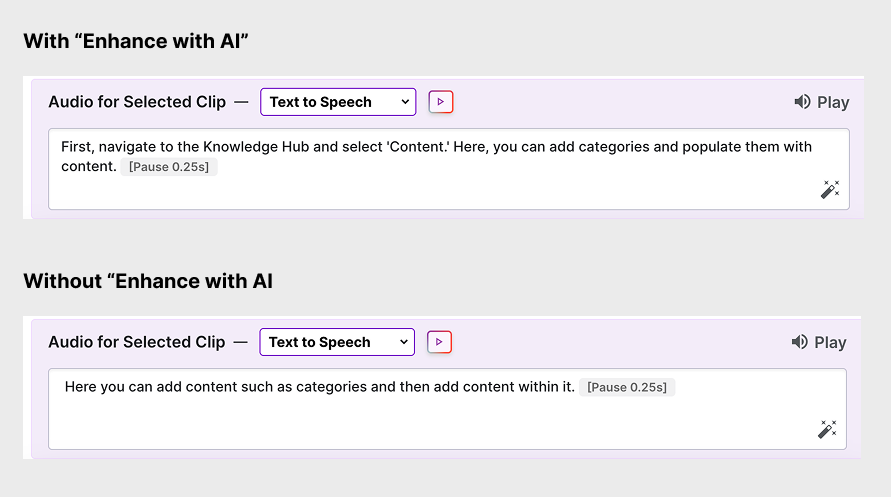
Real Impact: Our Before/After Experiment
The results:
Version without AI: Natural speech with uneven pacing, and weird sentence formation
Version with AI: Smooth, professional narration with clear delivery. The voicever even adds "inverted commas" for action emphasis in the voiceovers.